
Late one night while racing to meet a content deadline, I found myself staring at an AI-generated draft that needed serious work.
My client specifically requested human-written content, and I needed a way to make this piece pass AI detection. That’s when I discovered AIHumanizer.ai, a tool claiming to transform AI text into undetectable human-like content.
After spending considerable time testing AIHumanizer.ai across multiple projects and use cases, I’ve put together this comprehensive review to help you decide if it’s worth your time and money. I’ll cover:
- The tool’s actual effectiveness at bypassing AI detection
- Key features and how they perform in real-world scenarios
- Pricing details and whether the premium version delivers value
- A detailed breakdown of who should (and shouldn’t) use this tool
First things first – let’s look into the details of my testing methodology so you understand exactly how I evaluated AIHumanizer.ai.

How I Tested AIHumanizer.ai: My Process Explained
To thoroughly evaluate AIHumanizer.ai’s capabilities, I designed a rigorous testing protocol using multiple types of content and various AI detection tools. Starting with ChatGPT, I generated several pieces of content ranging from blog posts to technical articles.
Then, I ran each piece through AIHumanizer.ai using all three of its bypass modes: Basic, Standard, and Advanced.
To verify the results, I tested both the original and “humanized” versions using four leading AI detection tools: Originality.ai, Writer AI, GPTZero, and Copyleaks.
This allowed me to assess not just whether the content could bypass a single detector, but how it performed across multiple platforms with different detection algorithms.
What is AIHumanizer.ai?
AIHumanizer.ai is a web-based tool designed to modify AI-generated text so it appears more human-written. The platform works by analyzing your content and making strategic adjustments to sentence structure, vocabulary, and writing patterns that typically trigger AI detection tools.
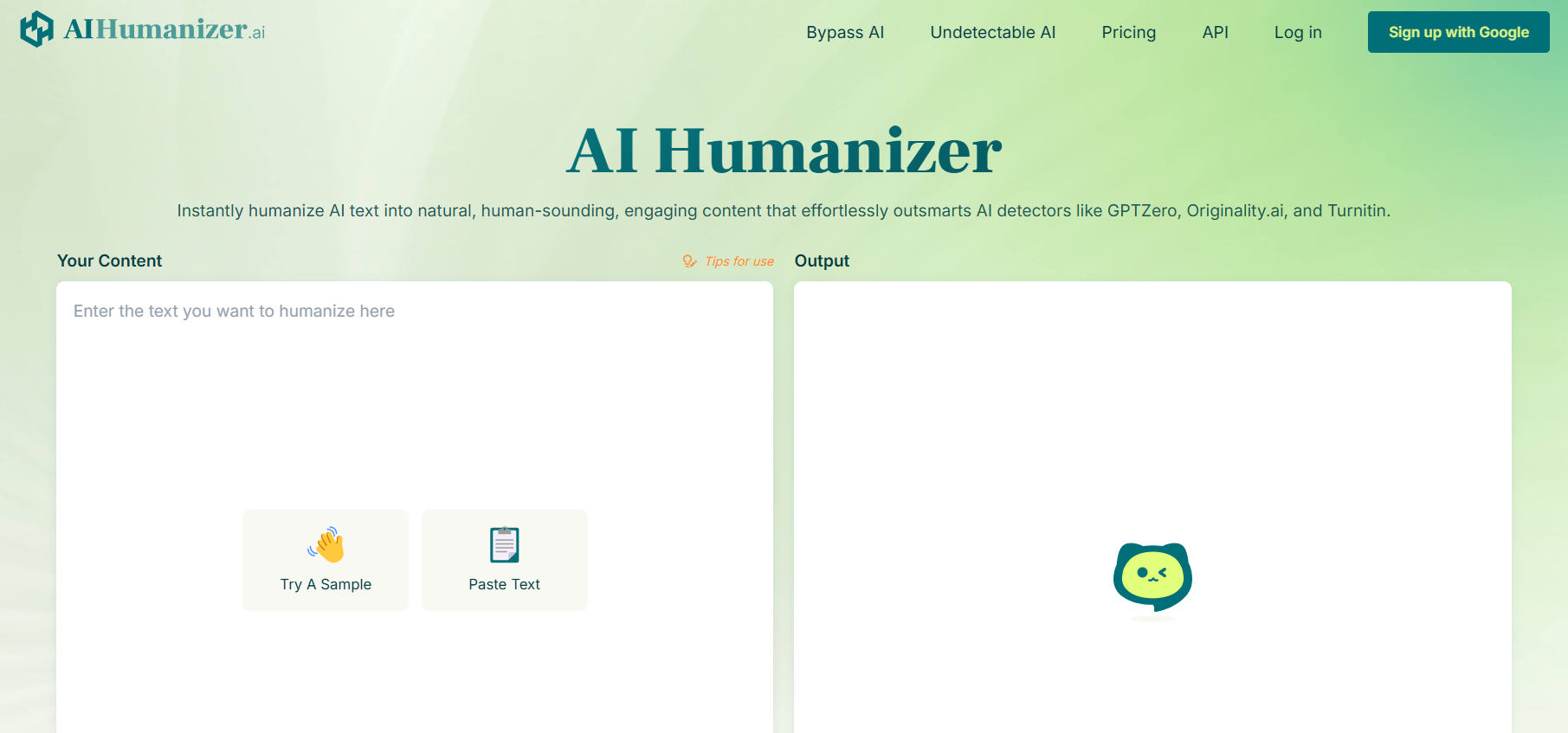
The tool employs advanced language processing to transform content while attempting to preserve the original meaning. It aims to help content creators, marketers, and writers who use AI tools as part of their workflow but need their final output to pass AI detection checks.
Key Features of AIHumanizer.ai
The success of any AI humanizing tool hinges on its core capabilities and how well they actually perform. Let’s examine the standout features that make AIHumanizer.ai noteworthy.
Three-Tier Bypass System
AIHumanizer.ai’s most distinctive feature is its three-level bypass system. Basic mode makes minimal adjustments to improve AI detection scores without significantly altering the text. Standard mode offers a middle-ground approach with moderate changes, while Advanced mode implements the most aggressive transformations to beat strict detection tools.
This tiered system gives users control over how much they want to modify their content. When working with technical content where precision is crucial, Basic mode helps maintain accuracy while still improving detection scores. For marketing copy where creativity matters more than exact wording, Advanced mode can generate more human-like variations.
Built-in AI Detection
The platform includes integrated AI detection scanning that automatically checks your humanized content against multiple detection tools.
This saves valuable time by eliminating the need to manually test content on separate platforms. The real-time feedback helps users quickly determine if their content needs additional modification.
Preservation Features
AIHumanizer.ai attempts to maintain key elements of the original text while making its changes. The tool preserves formatting, including headers, lists, and paragraph breaks.
It also tries to keep important terminology intact, particularly useful for technical or specialized content where specific words carry precise meanings.
Other Features
Beyond its core capabilities, AIHumanizer.ai offers several additional features worth noting:
- Browser extension for quick access
- Bulk processing for multiple documents
- Custom dictionaries for industry-specific terminology
- Version history to track changes
- Export options in multiple formats
Who Should Use AIHumanizer.ai?
Before diving into performance details, let’s identify who might benefit most from this tool.
- Content Marketing Teams: Fast-paced content creation environments where AI tools help meet high-volume demands. The tool can help maintain content quality while ensuring it passes increasingly common AI detection checks.
- Freelance Writers: Independent professionals who use AI for research and drafting but need their final deliverables to read naturally and pass client AI detection requirements.
- Digital Marketing Agencies: Organizations handling multiple client content needs who want to leverage AI while ensuring deliverables meet quality standards and pass detection tools.
- Educational Content Creators: Course creators and educational writers who use AI to help generate materials but need content that feels personal and engaging.
Does AIHumanizer.ai Really Work As Claimed?
After extensive testing across multiple content types and detection tools, here’s what I discovered about AIHumanizer.ai’s effectiveness.
Basic Mode Performance
The Basic mode showed mixed results in my testing. While it improved detection scores slightly on tools like Writer AI (reducing AI probability from 22% to 0%), it failed to consistently bypass stricter detectors like Originality.ai. The content maintained good readability but still triggered AI detection flags.
Reliability Score: 6/10
Standard Mode Performance
Standard mode demonstrated better success at bypassing detection tools but often at the cost of readability. The content passed GPTZero and Copyleaks consistently but still struggled with Originality.ai. Some sentences became awkward or unclear after processing.
Reliability Score: 7/10
Advanced Mode Performance
The Advanced mode showed the highest success rate for bypassing detection but often produced significantly altered content that lost clarity and sometimes changed meaning. While it achieved “human” scores on most detection tools, the resulting text frequently required substantial editing to maintain professional quality.
Reliability Score: 5/10
How to Use AIHumanizer.ai
Getting started with AIHumanizer.ai is straightforward. Here’s a practical guide to using the tool effectively:
Initial Setup
- Create an account on AIHumanizer.ai
- Choose your subscription level
- Install the browser extension (optional)
Basic Usage
- Paste your AI-generated content into the input box
- Select your desired bypass mode
- Click “Humanize” to process your content
- Review the results and AI detection scores
- Export or copy your humanized content
AIHumanizer.ai Pricing: How Much Does It Cost?
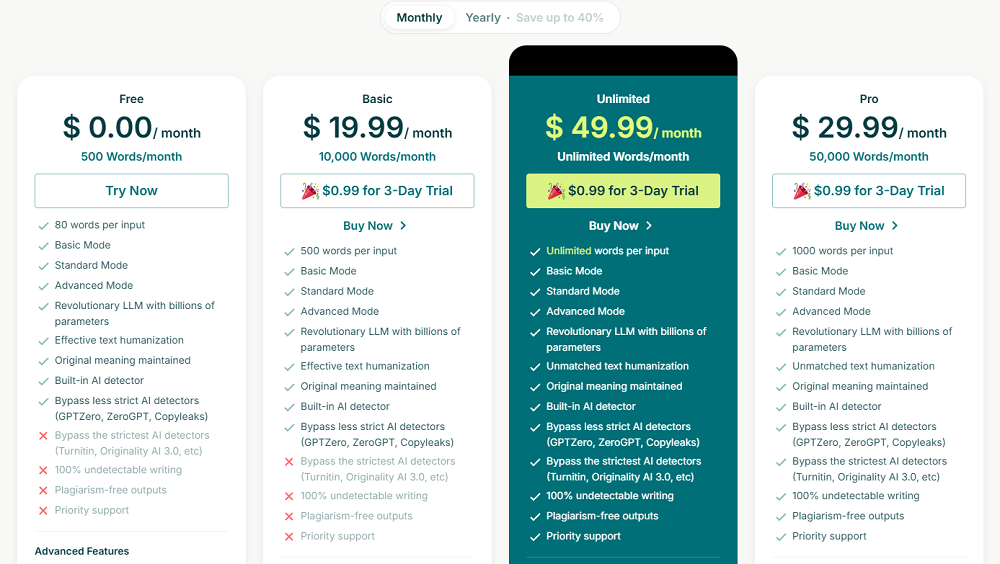
AIHumanizer.ai offers four distinct pricing tiers with monthly and yearly payment options:
Free Plan:
- $0.00/month
- 500 words/month limit
- 80 words per input
- Basic, Standard, and Advanced modes included
- Basic AI detector bypass capabilities (GPTZero, ZeroGPT, Copyleaks)
- Built-in AI detector
- Cannot bypass stricter AI detectors like Turnitin and Originality AI
Basic Plan:
- $19.99/month
- 10,000 words/month
- 500 words per input
- $0.99 for 3-day trial available
- All modes included (Basic, Standard, Advanced)
- Similar features to free plan but with higher word limits
- Cannot guarantee 100% undetectable writing
Unlimited Plan:
- $49.99/month
- Unlimited words/month
- Unlimited words per input
- $0.99 for 3-day trial available
- All premium features included
- Bypass capabilities for strict AI detectors (including Turnitin, Originality AI 3.0)
- 100% undetectable writing claim
- Priority support
- Plagiarism-free outputs
Pro Plan:
- $29.99/month
- 50,000 words/month
- 1000 words per input
- $0.99 for 3-day trial available
- All features from the unlimited plan
- Better value than Basic plan for high-volume users
All paid plans include the revolutionary LLM with billions of parameters, effective text humanization, and original meaning maintenance. The platform also offers yearly subscriptions with savings of up to 40% compared to monthly rates.
Based on these pricing tiers, casual users might find the free plan sufficient for occasional use, while professional content creators or agencies would likely benefit more from the Unlimited or Pro plans depending on their monthly word count needs.
Pros and Cons of AIHumanizer.ai
After thorough testing, here are the key advantages and drawbacks I discovered:
Pros
- User-friendly interface with intuitive controls
- Multiple bypass modes for different content needs
- Built-in AI detection saves time
- Browser extension adds convenience
- Supports multiple file formats
- Preserves basic formatting
Cons
- Inconsistent success rates with stricter AI detectors
- Advanced mode often produces unclear content
- Free version has significant limitations
- Premium pricing may be steep for casual users
- Some processed content requires substantial editing
- No guarantee of bypassing all detection tools
AIHumanizer.ai Review: My Verdict
After extensive testing and real-world use, AIHumanizer.ai proves to be a tool with potential but significant limitations. While it can help content pass some AI detection tools, its success rate varies considerably, and the resulting content often requires additional editing to maintain professional quality.
The tool’s multiple bypass modes and built-in detection features show thoughtful design, but the inconsistent results and potential impact on content clarity make it difficult to recommend without reservations. For users who need occasional help bypassing AI detection, the free version might suffice. However, the premium versions’ value proposition remains questionable given the reliability issues.
If you’re considering AIHumanizer.ai, I’d recommend starting with the free version to test its effectiveness with your specific content needs before committing to a paid plan. The tool can be helpful as part of a broader content strategy but shouldn’t be relied upon as a complete solution for bypassing AI detection.
Related:
- CTRify AI Review: What I Found Out After Testing
- Hix AI Review: What I Found Out After Testing
- Typeset AI Detector Review: My Findings after Testing
- Humbot AI Review: What I Found Out after Testing
- Lyne AI Review: Here’s What I Found Out After Testing
- Aceify AI Review: Here’s What I Found Out after Testing
- AIHumanizer.ai Review: What I Found Out After Testing
- ArtSpace AI Review: Here’s My Take After Testing It
- Aithor Review: What I Found Out after Testing