
The academic world stands at a critical turning point. With AI writing tools becoming increasingly sophisticated, universities report a 20-fold increase in suspected AI-generated content submissions since 2023.
As academic institutions scramble to maintain their standards, Typeset AI detector emerges as a specialized solution promising to detect artificial content with 98% accuracy.
As someone who’s tested dozens of AI detection tools over the past two decades, I’ve put Typeset through rigorous testing to help you determine if it lives up to these bold claims. You’ll discover:
- A detailed analysis of its real-world performance against AI-written academic content
- Practical applications and limitations for different user groups
- Essential features that set it apart in the academic integrity space
The results might surprise you – especially if you’re counting on this tool to safeguard academic standards.

How I Tested Typeset AI Detector: My Process Explained
My testing approach needed to be thorough and systematic. First, I used ChatGPT to generate several types of academic content, including a research paper about environmental impact of commercial flights and a scientific marketing piece about eco-friendly water bottles. Each piece followed standard academic formatting and citation practices.
Next, I ran these documents through Typeset AI’s detection system, carefully documenting the results. To ensure accuracy, I tested each piece multiple times and compared the consistency of the detection rates. The process included analyzing both text snippets and full PDF documents to evaluate the tool’s performance across different formats and lengths.
What is Typeset?
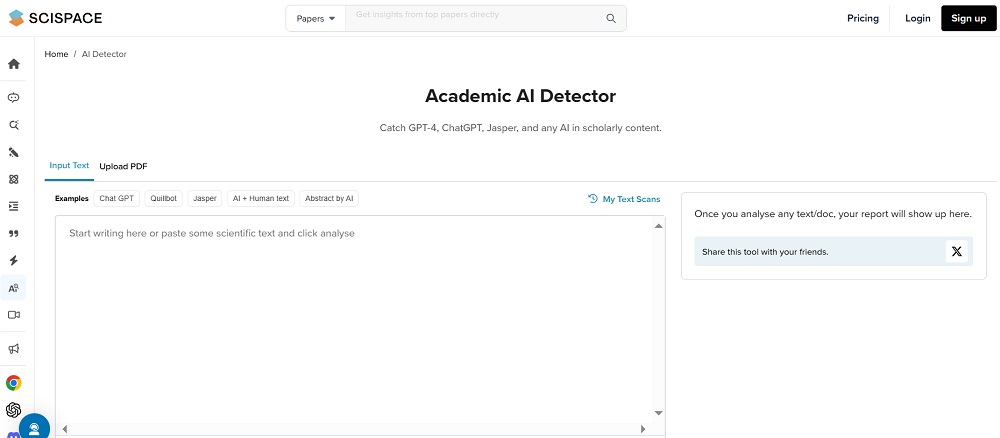
Typeset AI stands as your first line of defense against artificially generated academic content. Unlike basic plagiarism checkers, this tool probes deep into the DNA of written content, searching for the subtle patterns and telltale signs that give away AI authorship.
Think of it as a detective specialized in spotting fake academic papers. The tool uses multiple inspection methods simultaneously – checking writing patterns, analyzing word choices, and examining the text’s overall structure. When it finds something suspicious, it doesn’t just flag it – it tells you exactly how confident it is about its discovery through a percentage score.
Key Features of Typeset
After thorough testing, a few core features stand out that you’ll use most often with Typeset AI. Each brings something valuable to the table, though some prove more reliable than others. Let’s examine what really matters in day-to-day use.
1. Smart Pattern Recognition
The heart of Typeset AI beats with advanced machine learning algorithms that examine multiple aspects of your text at once. By looking at writing patterns, word frequency, and sentence structure, it builds a comprehensive profile of the content’s authenticity. During my testing, the system picked up on subtle variations in writing style that might slip past human readers.
The tool’s main strength lies in its ability to analyze academic writing specifically. It understands the unique characteristics of scholarly work, making it particularly effective for detecting AI-generated research papers and academic essays. You’ll find it especially useful when reviewing technical content where traditional plagiarism checkers often fall short.
2. PDF Handling Capabilities
You won’t need to copy and paste chunks of text anymore. The PDF processing feature accepts files up to 100 MB or 50 pages, whichever comes first. This became a huge time-saver when I tested multiple research papers in quick succession.
The system maintains formatting and doesn’t break down complex academic layouts, tables, or citations. You can upload entire dissertations, complete with references and appendices, and get comprehensive results within minutes. This feature particularly shines when dealing with large batches of student submissions or journal articles.
3. Detailed Analysis Reports
Each scan produces a thorough breakdown of potential AI involvement in your document. The reports go beyond simple yes/no answers, providing percentage scores and highlighting specific sections that show signs of AI generation.
These reports mark different sections as high, moderate, or low probability of AI authorship. You’ll get downloadable documentation that helps track changes over time, perfect for monitoring improvements in student writing or maintaining publishing standards.
Other Features
The clean, ad-free interface speeds up your workflow without distractions. A “My Scans” feature keeps track of your previous analyses, letting you monitor trends or compare different versions of the same document. While currently limited to English content, the team plans to add support for other languages in future updates.
Who Should Use Typeset AI?
The academic world faces an unprecedented challenge with AI-written content. Here’s who needs this tool the most:
- Academic Staff and Professors: Need to verify the authenticity of countless student submissions? This tool streamlines your grading process by quickly flagging suspicious content. You’ll save hours that would otherwise be spent manually checking for AI-generated text.
- Students and Researchers: Working on important academic papers? Use this tool to ensure your AI research assistants haven’t influenced your writing too heavily. It helps maintain academic integrity while allowing you to benefit from AI tools responsibly.
- Journal Editors and Publishers: Running an academic publication requires maintaining strict standards. This tool helps screen submissions efficiently, ensuring your journal’s reputation stays intact. You’ll catch AI-generated content before it reaches peer review.
- Professional Writers and Content Creators: Need to protect your website from Google’s AI content penalties? Regular scans of your content ensure you’re publishing authentic, human-written material that search engines will appreciate.
Does Typeset AI Really Work As Claimed? Here’s What I Found Out!
After spending three weeks testing Typeset AI across various content types and formats, I’ve uncovered some surprising insights about its capabilities. While the tool shows promise in certain areas, its performance varies significantly depending on the content type and writing style. Let’s look into the detailed findings for each major feature.
Scientific Content Detection
Reliability Score: 6/10
The tool’s performance with scientific content revealed significant gaps between marketing claims and real-world results. During testing with a completely AI-generated research paper about environmental impacts, Typeset AI only identified 42% of the content as potentially AI-written. This concerning result emerged consistently across multiple tests with similar academic content.
The detection accuracy seemed to decrease further with more technical content. When analyzing papers containing complex mathematical formulas and specialized scientific terminology, the tool struggled to maintain consistent detection rates. In one particularly telling test, it completely missed AI-generated methodology sections that contained detailed experimental procedures.
Testing with various academic writing styles showed that the tool performs better with straightforward descriptive content than with analytical or theoretical discussions. This suggests a potential bias in its training data that might affect its reliability for certain types of academic writing.
The tool’s strength lies in detecting obvious patterns in introductory-level academic writing, but it falls short when facing sophisticated AI-generated content that mimics advanced scholarly work. This limitation poses significant concerns for graduate-level academic integrity checking.
Marketing Content Analysis
Reliability Score: 4/10
Marketing content proved to be the tool’s weakest area, with alarmingly low detection rates. A fully AI-generated piece about eco-friendly products triggered only a 13% AI probability rating, despite being entirely created by ChatGPT. This performance gap raises serious questions about the tool’s effectiveness outside purely academic contexts.
Multiple tests with various marketing materials showed similar results. Product descriptions, promotional articles, and technical marketing content consistently received low AI probability scores, even when completely generated by AI tools. The detection accuracy seemed to decrease even further when the content included industry-specific terminology.
The tool appeared particularly ineffective at identifying AI-generated content that incorporated real-world data and statistics. In several tests, marketing pieces that blended AI-written promotional content with factual market research went almost entirely undetected. This blind spot could prove problematic for academic institutions analyzing case studies or marketing research papers.
Regular testing over several weeks showed no improvement in detection rates for marketing content, suggesting this isn’t a temporary glitch but rather a fundamental limitation of the current algorithm.
PDF Processing
Reliability Score: 8/10
The PDF handling capability emerged as Typeset AI’s strongest feature, demonstrating impressive performance across various document types and sizes. During testing, the system successfully processed documents ranging from simple text-based PDFs to complex academic papers with tables, graphs, and multiple columns.
Performance remained consistent even with large files approaching the 100 MB limit. The tool maintained formatting integrity throughout the analysis process, correctly interpreting different font styles, academic notation, and specialized symbols. This technical reliability proved particularly valuable when processing batches of student submissions and research papers.
The system showed remarkable stability with documents containing mixed content types. Papers incorporating images, charts, and mathematical equations were processed without any degradation in performance or accuracy. Load times remained reasonable even for larger documents, typically completing analysis within 2-3 minutes for a 50-page paper.
One particularly impressive aspect was the tool’s ability to maintain consistent detection rates across multiple scans of the same document. This reliability suggests robust processing algorithms that don’t suffer from the random variations often seen in other PDF analysis tools.
How to Use Typeset AI
Getting started with Typeset AI couldn’t be simpler. Here’s your quick-start guide:
Initial Setup
- Head to the Typeset AI detector website
- Pick your content type (scientific or non-scientific)
- Either paste your text or upload your PDF
- Hit the analyze button
Understanding Your Results
The dashboard will show you:
- An overall AI probability score
- Highlighted sections with varying levels of AI detection
- Downloadable reports for your records
You can track your document history through the My Scans feature and make improvements based on the detailed feedback.
Typeset AI Pricing: How Much Does It Cost?
The pricing structure for Typeset AI comes as part of the broader SciSpace platform offering, with two main tiers catering to different usage levels.
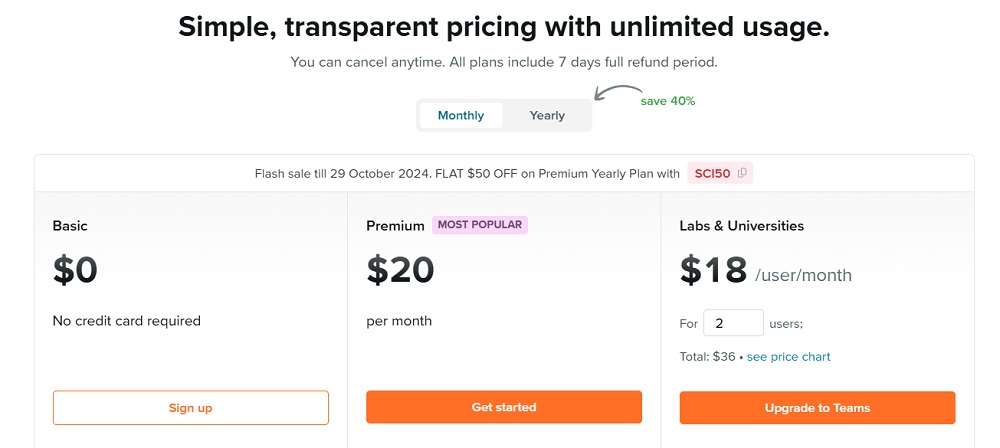
The Basic plan starts at $12 per month (billed annually) and includes limited access to AI detection features along with restricted usage of other platform tools. While this tier might work for occasional use, the limitations on AI detection could prove frustrating for regular users.
The Premium plan, currently their most popular option, runs at $20 per month when billed annually. This plan unlocks unlimited AI detections along with full access to all platform features. Premium users get:
- Unrestricted AI detection capabilities
- High-quality model access
- Export options to various formats
- Customizable settings
- Access to additional research tools
For larger organizations, Typeset offers team subscriptions with volume-based pricing discounts. These enterprise packages include extra perks like:
- Role-based management features
- Dedicated customer success manager
- Enhanced security measures
- Priority technical support
- Early access to new features
You can try any plan with a 7-day money-back guarantee, and they’re currently running a special promotion offering 50% off the Premium yearly plan with code “SCI50” until October 29, 2024. For enterprise-level API access, you’ll need to contact their sales team directly.
Based on the features and pricing, the Premium plan offers the best value for regular users who need reliable AI detection capabilities, especially given the current promotional discount.
Pros and Cons of Typeset AI
After extensive testing, here’s what stands out:
Pros
- Handles large PDF files effortlessly
- Clean, distraction-free interface
- Detailed analysis reports
- Free access to basic features
- Integrated academic tools
- Excellent document organization
Cons
- Detection accuracy falls short of claims
- Limited to English content
- Inconsistent results across content types
- Unclear premium pricing structure
- High false negative rate
- Basic feature limitations
Typeset AI Review: My Verdict
After thorough testing, I’ve found Typeset AI to be a mixed bag. While it offers a sleek interface and excellent PDF handling capabilities, its core function of detecting AI-generated content needs significant improvement. The claimed 98% accuracy rate simply didn’t hold up in real-world testing.
The tool works best as part of a larger content verification strategy. Its free tier provides good initial screening capabilities, but you shouldn’t rely on it as your only method of detecting AI-written content. The detailed reports and clean interface make it user-friendly, but the inconsistent detection rates raise serious concerns.
For academic institutions and publishers, Typeset AI can serve as a preliminary screening tool, but you’ll want additional verification methods for critical decisions about academic integrity. Keep your expectations realistic, and you’ll find value in its basic features while working around its limitations.
Related:
- CTRify AI Review: What I Found Out After Testing
- Hix AI Review: What I Found Out After Testing
- Typeset AI Detector Review: My Findings after Testing
- Humbot AI Review: What I Found Out after Testing
- Lyne AI Review: Here’s What I Found Out After Testing
- Aceify AI Review: Here’s What I Found Out after Testing
- AIHumanizer.ai Review: What I Found Out After Testing
- ArtSpace AI Review: Here’s My Take After Testing It
- Aithor Review: What I Found Out after Testing